v1.0.3Windows 10/11

The firewall that shows its work.

connections named to the program that made them · 100 protocols identified · 30+ read inside with Pro

Per-app enforcement on Windows. Zero telemetry.

100protocols identified · 30+ read inside with Pro
0telemetry — verify it on the wire
7ways to enforce — system-level, even on Free
$0Free forever — real enforcement, no account

A firewall that understands your traffic.

A powerful Windows host firewall: per-app enforcement with a full rule engine, 100 protocols identified (30+ read inside with Pro), connections named to the program that made them, and verdicts you can trust.

Enforce by app — and by every rule

Allow or block per executable at the system level — then go further: IP and CIDR (v4 + v6), port and protocol, inbound, DNS-layer domains, time-window and country rules. On every edition, including Free — and your rules keep working after the app is closed or the PC restarts.

Know what’s really on the wire

Ferrite names 100 application protocols on every plan — HTTPS, QUIC, SSH, DNS, SMB and more. With Pro it reads inside 30+ of them: the TLS server name and JA3 · JA4 fingerprints, HTTP request headers, SSH banners and DNS lookups — and lets you write rules on what it finds.

Connections named to their program

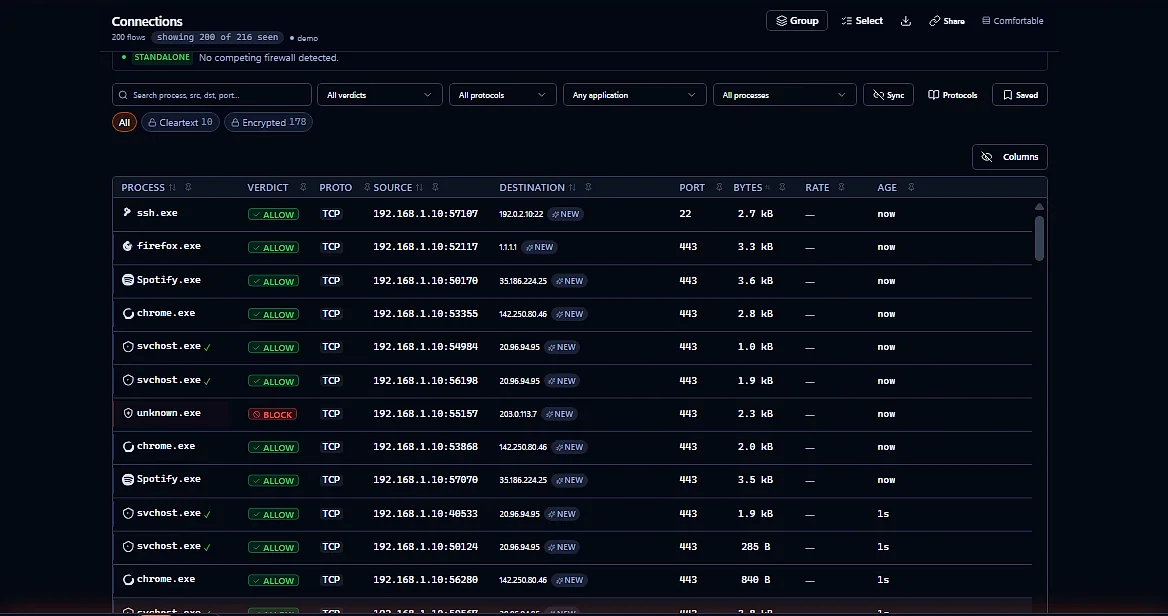
Ferrite sees each connection’s first packet and names it to the program that opened it, using Windows’ own connection table checked every quarter second — with the destination, the protocol and a live verdict. One that opens and closes between checks, or that Windows won’t attribute, shows as Unknown program, never a guess.

Verdicts you can trust

Ferrite badges what it does and doesn’t enforce — a rule with nothing to act on says so, instead of glowing green and doing nothing. And it sends zero telemetry: the processes you run and the hosts you reach never leave your machine.

See it. Name it. Enforce it.

Each connection your machine makes goes through one three-step pass — seen, named, then checked against your rules at the system level. One admin prompt at install; the app itself runs without it.

01

See

Ferrite picks up each new connection from its first packet — every program, live.

Live · from the first packet
02

Name

It resolves each connection to its program, destination, protocol and domain name, and recognizes 100 protocols — so a bare IP and port becomes something you can read.

App · destination · protocol · DNS
03

Enforce

Your rules apply system-wide — by app, IP, port, domain, time or country — and hold after the app closes or the PC reboots.

System-level · per-app · persistent

Real system-level enforcement — even on Free.

Everything below blocks at the system level, in every edition including Free — per app, and by a full set of rule types. No add-on, no asterisks.

CapabilityEvery edition · incl. Free
Per-app allow / block Enforces
Destination IP / CIDR · IPv4 + IPv6 Enforces
Port / range · TCP + UDP Enforces
Inbound rules · boot-time persistence Enforces
DNS-layer domain blocking Enforces
Time-window rules · after-hours / weekends Enforces
Country / geo rules · outbound Enforces (most)

Country blocks expand to their IP-block set and install as system-level filters — proven on hardware. The 16 largest IP allocators — including the US, UK and Germany — exceed the filter budget, so Ferrite flags them “not enforced” rather than faking a green check.

Everything your PC is doing, named and blockable.

Real capabilities, shipped today — not a roadmap.

Demo traffic — not your dataFerrite's Connections screen: a live-style table of flows, each resolved to its process, protocol, source, destination, and allow/block verdict
Captured from Ferrite running on synthetic demo traffic, not a live user’s machine — the layout and verdict logic are real, the flows shown are not.
Connections

Connections have names

Each connection named to the program that opened it, with its protocol and verdict — not just an IP and a port.

Dashboard

Your protection, live

Throughput, active connections, and protection state, updated in real time.

DNS

DNS bypass, blocked

Apps that bring their own encrypted DNS are blocked, and Ferrite shows which one tried. One switch, every plan; off until you turn it on.

Events

Every decision, logged

Every allow and block, timestamped and kept for 90 days on every plan; Pro replays exactly what happened, and when.

Geo lookups that phone home

Where it's really talking

Every destination placed by country, entirely offline: a country database ships with Ferrite, and you can add your own for cities and networks.

Enforcement

A rule for everything

Allow or block by app, IP/CIDR, port, domain, time-window, or country — enforced at the system level.

Stops apps from skipping your DNS.

Some software brings its own encrypted DNS (Firefox can switch to a provider of its own, and other apps ship one), which walks around the resolver and the blocklists you chose. With Bypass prevention on, Ferrite blocks that traffic and shows which program tried. It is one switch, off until you turn it on, and it is there on every plan.

  • Bypass prevention — every edition (Pro adds exceptions for apps you trust)
  • 6 secure-DNS providers built in · DoH / DoT / DoQ · your own server on Pro
  • Ad, tracker & malware blocklists, plus your own sites: 100 on Free, up to 2,000 on Pro
  • Offline country lookup — no lookups phone home
Learn exactly how this works →
● Every edition · you turn it on
● Chosen resolver● Bypass — blocked

Free protects you. Pro is the full instrument.

Free is genuinely useful — real system-level enforcement, real visibility, known threats flagged, no account. Pro adds the deep-analysis stack for people who want to take connections apart.

Deep inspection Pro

Free names 100 protocols. Pro reads inside 30+ of them: the TLS server name and JA3 · JA4 fingerprints, HTTP request headers (JA4H), SSH banners, DNS lookups. It then lets you write rules on what it finds, so “unknown.exe → some IP” becomes a named connection with a reason.

It reads what a connection says in the clear. Ferrite does not decrypt your HTTPS.

A dark 3D globe with glowing connection arcs fanning out from a home point to destinations worldwide

3D globe & graph Pro

Watch flows on a live 3D globe and network graph, rolled up by country (and by network, if you add your own MaxMind ASN file) — resolved entirely on your machine, so no lookups ever phone home.

Query, Replay, Graph & Board Pro

Run real SQL (DuckDB) over your connection history, scrub the Replay timeline to see exactly what happened and when, and lay it out as a Graph or a Board. Ferrite keeps 90 days of history on every plan; the Pro views are what read it.

Unlimited rules, and modes that switch themselves Pro

Drop the Free 25-rule cap. Build, import and export unlimited rules, switch modes by network or time of day, and give each app its own policy. The three modes, Permissive, Balanced and Strict, are on Free.

Real protection is free. Pro is the full instrument.

System-level protection is free, forever, no account. Pro is CA$99/yr per device (≈US$71), or CA$9.99/mo (≈US$7.20), with a 3-day trial, no card. Billed in Canadian dollars; your card issuer converts at its own rate.

Free
$0forever
No account required

Real protection for everyone — system-level enforcement, no account.

Download free
  • System-level per-app blocking — up to 25 rules
  • Per-process connection visibility
  • Bypass prevention for DNS (you turn it on)
  • Secure DNS · ad, tracker and malware blocking · 100 sites of your own
  • Known threats flagged and explained · Permissive / Balanced / Strict modes
  • 100 protocols named · offline country lookup
Platform
Windows 10 / 11 · 64-bit
Other firewalls
Detects the ones it finds and runs alongside or defers, so two firewalls don’t fight — Settings ▸ Engine & service shows what it chose
Built in
Rust · zero telemetry · signed rule store (ML-DSA-65) · SHA-256 published · minisign auto-updates
Roadmap
macOS (system extension) · Linux (eBPF / TC)

Every feature, side by side.

FeatureFreePro
Core visibility
Per-process connection visibility✓✓
Connection history kept on your PC (90 days)✓✓
Browse, query and replay that history—✓
Known threats flagged and explained✓✓
Protocols named (100: HTTPS, QUIC, SSH, DNS, SMB…)✓✓
Offline country lookup✓✓
Enforcement · system-level (app · IP · port · domain · time · geo)
Per-app allow / block✓✓
IP / CIDR (v4+v6), port / range, TCP / UDP, inbound✓✓
Boot-time persistence✓✓
DNS-layer domain blocking✓✓
Bypass prevention: blocks apps that use their own encrypted DNS (you turn it on)✓✓
Exceptions to it for apps you trust, such as a VPN client—✓
Time-window rules✓✓
Country / geo rulesMost countriesMost countries
Firewall rulesUp to 25Unlimited
Your own blocked sites1002,000
Modes (Permissive / Balanced / Strict)✓✓
Modes that switch by network or time · a policy per app—✓
Rule export / import (.frules)—✓
Deep analysis
Deep inspection: reads inside 30+ protocols (TLS server names, HTTP headers, SSH banners, DNS lookups)—✓
JA3 · JA4 · JA4H fingerprints—✓
Rules on what is inside a connection (server name, fingerprint, payload)—✓
Signed rule store (ML-DSA-65, FIPS 204)✓✓
Your own DNS-over-HTTPS server—✓
SQL analytics over your history (DuckDB)—✓
Replay timeline scrubber—✓
3D globe · Graph · Board—✓
Webhooks—✓
Licensing & platform
LicensingNo accountPer device
SupportCommunityPriority email
Windows 10 / 11 (64-bit)✓✓
macOSRoadmapRoadmap
Linux (eBPF / TC)RoadmapRoadmap

Every plan names each connection’s protocol; Pro reads inside the ones it can and lets you write rules on what it finds. Ferrite does not decrypt your HTTPS. Country / geo rules enforce at the system level — a country expands to its IP-block set as system-level filters, proven on hardware; the 16 largest IP allocators exceed the filter budget and are badged “not enforced” rather than faked.

The honest answers.

Is the Free tier actually useful, or just a teaser?

Genuinely useful. Free protects you after one click: the first time you open Ferrite it asks once, and “Turn on protection” blocks trackers and ads and encrypts your DNS lookups (“Not now” leaves DNS as it was, and Overview offers it again later). Free also gives you real system-level per-app enforcement, per-process visibility, and known threats flagged and explained, each with the way to stop it. Pro adds the deep-analysis stack (deep inspection, Query, Replay, Graph, Board), unlimited rules and your own DNS provider.

What can Ferrite enforce?

At the system level, Ferrite can allow or block by app, by IP or CIDR (v4 + v6), by port and protocol, by domain (DNS-layer), by time-window, and by country — inbound and outbound. Rules persist across reboots and keep working even when the app is closed. Free covers up to 25 rules; Pro is unlimited.

Why is Pro priced per device?

Ferrite is a host firewall — it protects the machine it’s installed on. Pricing per device keeps that honest and simple: each machine you want the full instrument on is one Pro device. Running it on several? Each machine gets its own key.

Is there a free trial of Pro?

Yes — 3 days, no credit card. Start it from the License panel inside the app. When the trial ends, Pro features revert to Free, and anything Pro-only you saved (a DNS server of your own, a policy per app) is kept but not applied until Pro returns. Your rules and settings stay exactly as they were.

How do I activate Pro after I buy it?

Checkout runs through Polar, our merchant of record, which emails you a FERRITE_ license key (also visible in your Polar customer portal). Install Ferrite, open the License panel, and paste the key — the app validates it with Polar and unlocks Pro on that device. One device per key: deactivating inside the app, or from your Polar portal, frees the key so you can activate it on a new machine.

Can I cancel Pro, and what happens if I do?

Yes, any time. Your subscription stays active through the period you already paid for, then the device reverts to Free automatically — no auto-charge past that point, and your rules and settings aren’t touched.

Does Ferrite phone home?

No telemetry, at all — there’s nothing to opt out of. Beyond the signed update check, Ferrite downloads the public blocklists and threat lists it uses (abuse.ch’s, for example), checks a Pro license key with Polar, and talks to the secure-DNS resolvers you chose and any webhook you point somewhere. Nothing about your connections is sent to us or to anyone else.

How long does Ferrite keep connection logs?

Locally only — logs never leave your machine (see above). Ferrite keeps 90 days of connection history on every plan; Pro adds the tools to query and replay it (SQL analytics, Replay, Graph and Board).

Does Ferrite install a driver?

Yes. Ferrite bundles WinDivert, an open-source packet-capture driver (LGPL-3.0, loaded as a separate DLL), and its background service loads it on every install, Free included. Per-app blocking itself runs on Windows’ own filtering platform; the driver is how Ferrite sees each connection’s first packet and, with Pro, reads inside it. How enforcement works says exactly what it does, and the notices carry its license, its source and who signs it.

Will Ferrite work with my VPN?

If a VPN handles your DNS, Ferrite stands down its DNS filtering and says so, so the VPN’s DNS keeps working. Bypass prevention is separate: it can block a VPN client’s own encrypted DNS, and on Pro you can exempt that client. If something of yours stops resolving, turn Bypass prevention off under Protection ▸ DNS.

How do I uninstall Ferrite, and what happens to my rules?

Remove it from Windows Settings ▸ Apps. The uninstaller stops and removes Ferrite’s service, its filters and its driver, then asks whether to remove your data too (your rules, settings and logs). The default is No, so a later install picks your rules back up. The docs cover the silent and scripted cases.

Can I use Ferrite on a work or shared PC?

Only on a PC you own or are authorized to administer; the Acceptable Use Policy says so. On a managed work PC, ask your IT team first: Ferrite installs a background service and a driver, and both need admin rights.

Which platforms are supported?

Windows 10/11 (64-bit) today. macOS (system extension) and Linux (eBPF/TC) are on the roadmap; Pro buyers get beta access when each platform enters beta.

Ready for a firewall that shows its work?

Free forever. Real system-level enforcement. Zero telemetry.